
Download Redro – AI‑Powered Fashion Designer, Free Outfit Generator & Style Assistant
Overview: Why Redro Is Changing the Way We Dress
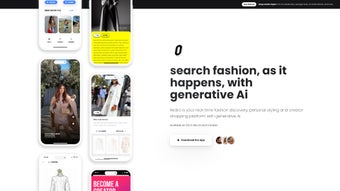
Redro is a cutting‑edge, AI‑driven web application built specifically for fashion lovers, stylists, and anyone who wants to turn a simple selfie into a runway‑ready look. By tapping into massive visual datasets from social media, fashion blogs, and trend‑watching platforms, Redro’s algorithms generate fresh outfit ideas that feel both personalized and globally on‑trend. The standout “Selfie Mode” analyses the clothing you’re already wearing, then suggests enhancements—whether it’s swapping a plain tee for a patterned blouse, adding a statement accessory, or re‑imagining the entire silhouette.
Beyond personal styling, Redro offers a virtual window‑shopping experience, letting users preview how new pieces would integrate with their existing wardrobe in real time. The platform automatically adapts suggestions to local fashion climates, seasonal shifts, and cultural nuances, ensuring that every recommendation feels relevant whether you’re in Tokyo, New York, or a small town. In short, Redro streamlines the creative process of outfit planning, democratizing high‑fashion styling and making it accessible to anyone with an internet connection.
The service also respects privacy: all uploads are encrypted, and users retain full control over their data, which can be deleted at any time. Whether you’re a busy professional looking to shave minutes off your morning routine, a student on a tight budget, or an influencer hunting fresh content, Redro provides a fast, secure, and inspiring way to explore style possibilities without the cost of a personal shopper.
Core Features That Set Redro Apart
- AI‑Generated Outfit Variations: Instantly receive multiple look‑book options based on a single photo, each complete with suggested accessories and footwear.
- Selfie Mode: Scan your current attire and get tailored upgrade suggestions in seconds, with visual overlays that show how each new piece would look on you.
- Real‑Time Window Shopping: Visualize new garments on a 3‑D avatar before you buy, reducing the risk of online‑shopping returns.
- Trend Localization: Algorithms adjust recommendations according to regional style trends, climate conditions, and cultural events, ensuring relevance everywhere.
- Customizable Style Profiles: Define your aesthetic—minimalist, streetwear, avant‑garde, business‑formal—and let Redro refine its output to match.
- Social Integration: Pull inspiration from Instagram, Pinterest, and fashion blogs directly within the app, turning your favorite feeds into actionable outfits.
- Outfit History & Export: Save favorite looks, export mood boards as PDFs or high‑resolution images, and share them with friends, personal shoppers, or on social media.
- Secure Cloud Storage: All user data is encrypted both in transit (HTTPS) and at rest, guaranteeing privacy while enabling cross‑device access.
- Continuous Learning: The AI improves over time by learning from user feedback, emerging runway collections, and seasonal releases.
- Progressive Web App (PWA) Support: Add Redro to your home screen for an app‑like experience with offline caching and faster load times.
Each feature has been engineered to reduce friction in the styling workflow. For example, the “Selfie Mode” not only identifies individual garments but also suggests complementary colors based on color‑theory principles, helping users avoid clashing palettes. Meanwhile, the “Trend Localization” engine parses millions of fashion posts daily, ensuring the recommendations stay fresh and reflective of what’s truly popular in a user’s locale. The combination of these capabilities creates a holistic styling assistant that feels both personal and globally aware, making Redro a standout in the crowded field of fashion tech tools.
Installation, Usage & System Compatibility
Getting Started – Simple Access, No Heavy Download
Redro is a fully web‑based platform, which means there’s no bulky installer to download. Users simply navigate to www.redro.com, create a free account, and can begin generating outfits immediately. For those who prefer a desktop‑like experience, Redro also offers Progressive Web App (PWA) support—click “Add to Home Screen” on Chrome, Safari, or Edge, and the app will behave like a native program with offline caching for faster load times.
Step‑by‑Step Usage Guide
- Create Your Style Profile: Choose preferred silhouettes, color palettes, and occasion categories (casual, business, event). This profile serves as the baseline for every AI suggestion.
- Upload a Photo or Enable Selfie Mode: Use your device camera or upload an existing image of your outfit. The AI processes the image in under ten seconds.
- Let the AI Analyze: Redro presents a carousel of suggested variations, each with detailed item breakdowns, price estimates, and styling notes.
- Interact and Refine: Swipe left/right to discard or keep ideas, adjust individual pieces, or request bolder suggestions using the “Push Boundaries” toggle.
- Save or Share: Export the final look as a high‑resolution image, PDF mood board, or share directly to Instagram Stories, TikTok, or a private link.
Supported Operating Systems
Redro runs on any modern web browser, making it compatible with Windows 10/11, macOS 12+, Chrome OS, Linux, as well as mobile platforms like Android 9+ and iOS 13+. Because the heavy lifting is performed in the cloud, even older devices can benefit from the full AI suite without performance lag, provided they have a stable internet connection.
Pros, Cons & Frequently Asked Questions
Pros & Cons
- Pros:
- Instant, high‑quality outfit ideas without hiring a personal stylist.
- AI adapts to local trends, ensuring relevance across cultures.
- No software download; works on any device with a browser.
- Secure cloud storage protects personal photos and style data.
- Free tier available with generous daily generation limits.
- Progressive Web App provides an app‑like experience.
- Continuous learning improves suggestions over time.
- Cons:
- Premium features (unlimited generations, brand‑specific recommendations) require a subscription.
- AI suggestions can occasionally miss nuanced personal tastes, needing manual tweaking.
- Dependence on internet connectivity for real‑time processing.
- Some high‑fashion brand integrations are still in beta.
- Learning curve for users unfamiliar with AI‑driven styling tools.
FAQ – Your Most Common Questions Answered
Is Redro really free to use?
Redro offers a robust free tier that allows up to 10 outfit generations per day. For power users, a monthly subscription unlocks unlimited creations, brand collaborations, and priority AI processing.
Can I use Redro on my smartphone?
Absolutely. Redro is optimized for Android and iOS browsers and also supports a dedicated PWA that you can add to your home screen for a native‑app feel.
How does Redro protect my personal photos?
All uploads are encrypted in transit (HTTPS) and at rest. Redro never shares your images with third parties without explicit consent, and you can delete any saved outfit history at any time.
Does Redro work with existing wardrobe inventories?
Yes. By uploading photos of your current closet, Redro can mix and match pieces you already own with virtual suggestions, helping you maximize what you already have.
What if I don’t like the AI’s suggestions?
You can provide feedback on each suggestion—thumbs up or down—and the model learns from your preferences, improving future recommendations.
Is there a way to try Redro without creating an account?
A limited guest mode is available, allowing you to generate up to three outfits per session without signing up. However, saving or exporting looks requires a free account.
Conclusion & Call to Action
Redro bridges the gap between high‑fashion inspiration and everyday practicality. Its AI engine not only saves time but also expands your style horizon, turning ordinary wardrobes into curated collections for any occasion. Whether you’re a busy professional, a student on a budget, or a fashion influencer seeking fresh content, Redro equips you with the tools to experiment confidently and share your looks instantly.
The free tier is generous enough for casual users, while the subscription adds powerful features for power users, making the service scalable with your needs. Security, cross‑platform accessibility, and continuous learning ensure that the platform remains both trustworthy and cutting‑edge. Ready to upgrade your style without the hassle of a personal shopper?
Sign up for free today, explore the Selfie Mode, and let Redro transform the way you dress.
Redro delivers a seamless, AI‑driven styling experience that feels both personal and cutting‑edge. The free tier is generous, the interface intuitive, and the suggestions impressively on‑trend. Minor drawbacks like occasional subscription prompts are outweighed by the value it adds to everyday dressing.



.png)



